14 KiB
2023-08-23 — Dev notes
Morning
Architecture changes
IO
-
need new status register, to hold current io device number
- could use the high byte of the Flags register, PSW style
-
need read/write instructions
- dev xx — select device xx
- or could do “ldd” and “std”
- inp xx — read one unit into memory, starting at xx
- out xx — write one byte from memory, starting at xx
- ? ota — write from A
- dev xx — select device xx
'B' register?
- maybe? add B register, based on IBM 704/709/7090 “m/q”
- i thought this might be needed as an IO buffer but now I’m thinking not
- might still need/want it for mul/div tho
- would need new instructions
- ldb
- stb
- tab
- tba
- ? xba (exchange a and b)
System/360 IPL
From the Wikipedia article on booting:
In the System/360 processors, an IPL is initiated by the computer operator by selecting the three hexadecimal digit device address (CUU; C=I/O Channel address, UU=Control unit and Device address[nb 2]) followed by pressing the LOAD button.
…
The IPL function in the System/360 and its successors prior to IBM Z, and its compatibles such as Amdahl's, reads 24 bytes from an operator-specified device into main storage starting at real address zero. The second and third groups of eight bytes are treated as Channel Command Words (CCWs) to continue loading the startup program (the first CCW is always simulated by the CPU and consists of a Read IPL command, 02h, with command chaining and suppress incorrect length indication being enforced). When the I/O channel commands are complete, the first group of eight bytes is then loaded into the processor's Program Status Word (PSW) and the startup program begins execution at the location designated by that PSW.
…
The disk, tape or card deck must contain a special program to load the actual operating system or standalone utility into main storage, and for this specific purpose "IPL Text" is placed on the disk by the stand-alone DASDI (Direct Access Storage Device Initialization) program or an equivalent program running under an operating system, e.g., ICKDSF, but IPL-able tapes and card decks are usually distributed with this "IPL Text" already present.
Evening
THIS WAS WRONG: Sense switches + Status register brainstorm
change status register format to:
ss dd ffff
- ss - sense switches
- dd - io devices
- ffff - flags
then you are limited to
- 4 switches
- 4 io devices
- 4 flags
Mainframe peripherals — new thoughts
this was written in response to the previous section, which i have abandoned… but i think the ideas here are still good
you could have an external switch that toggles between input from terminal vs punch
or i guess you make an all-in-one console that has a few modes
- keypunch
- teletypewriter
- card reader + line printer
- card reader + computer-controlled
ie, you can choose to connect…
- no input devices
- card reader
- typewriter
…and likewise for outputs (none / punch / printer).
Now from the computer’s perspective the devices are:
- 8 sense switches
- card reader / typewriter
- card punch / line printer
- display
and this works fine because the card and tty interfaces are the same
…and the sense switches get read as a binary number,
- TODO: commit current readme, then…
- TODO: update readme with this design
Mainframe peripherals: give them their own bus?
Should the DEV (IO device select) operation work over the address and data buses, or should it have its own?
…I guess I need a better understanding of what DEV really does.
OK I think that “DEV xx”:
- copies xx to the Device ID register
and then “OUT addr”
- copies the Device ID to the data bus
- copies addr to the address bus
- disconnects the data bus from memory, and connects the data bus to … ?
- some multiplexer? decoder? thing?
- (“disconnects” just means doesn’t send memory its chip-enable signal i guess)
- disconnects data bus from mem / connects it to IO device
- sends IO device its chip-enable signal
- ?? … IO device writes directly to memory
OR there’s a new register, IO buffer, and CPU handles the write to memory…
but then how does card input work?
perhaps:
- when card reader receives a read signal, it feeds in a card, then reads it into an internal buffer…
OK this is too complicated, let’s give up and redesign based on the IBM 701
Mainframe peripherals: new new interface
now we’ve got
- registers:
- “IOD” - 2 bits - address of current I/O device
“BUF” io buffer
- operations:
- DEV did — io start
- INP # — read 1 byte into memory
- INP ind
- OUT # — write 1 byte from memory
- OUT ind
- FED — feed / end of record / newline
it works like this
- “DEV” selects the IO device
- loads device id into IOD register
- “INP addr” …
- cpu sends io device an input request
- ?? details TBD... first idea:
- there are 2 "IODS" ("IO device select") pins on the CPU
- there are "/RD" and "/WR" pins on the CPU
- there's a "M/IO" pin on the CPU, which indicates whether to read/write from memory or from IO
- cpu signals IO device by...
- copying contents of IOD to the IODS pins
- pulling M/IO low
- pulling RD high
- io device checks its internal buffer… if it’s empty, it reads the next unit (card / line) into the buffer
- io device shifts a byte from the buffer to the data(?) bus
- cpu copies addr to the address bus
- cpu sends memory-write signal
- cpu sends io device an input request
- ?? details TBD... first idea:
- there are 2 "IODS" ("IO device select") pins on the CPU
- there are "/RD" and "/WR" pins on the CPU
- there's a "M/IO" pin on the CPU, which indicates whether to read/write from memory or from IO
- cpu signals IO device by...
- “OUT addr”
- cpu copies byte from addr to data bus
- cpu signals io device
- io device reads from data bus
- … io device does output
- … if io device is at end of line/card/etc, if does a line/card feed
- “FED”
- cpu signals io device to feed - TODO TBC: use a "IOE"
- io device feeds
! what i don’t understand is how the 701 signals the end of a record/card/line — or how I should do that
- → ok it seems like the 701 has a control line that the card reader uses to signal the end of a card
- also it halts the computer when it runs out of cards… is that good?
- I think so...
(the timing might be tricky here. it might be better to have the io device buffer the data as soon as it is selected. or maybe it’s even more complicated than that.)
CPU connections
- TODO: need pins for memory access — RW (signal which you want) and ME(?) (when this is high, memory performs the r/w on the rising edge of the next clock… or sth like that)
Some relevant parts of the 8086 pinout:
- M/IO — O — distinguish between memory and IO operations: IO is high, M is low
- /WR — O — write signal — write to memory or to output device, depending on state of M/IO
- /RD — O — indicates that the processor is performing a memory or IO read cycle, depending on state of M/IO
- READY — I — acknowledgement from memory/IO that it will complete the data transfer
Architecture idea: core + extensions
it might make sense to think in terms of something like the RISC V standards, where you the architecture is split into a mandatory core + optional extensions
- core computational operations — ie, the original set of 16 operations
- additional arithmetic operations — mul, div, rotates
- additional IO operations — dev, inp, out (ie the mainframe-style IO that i’m working on today)
then
- the basic microprocessor trainer would implement just the core computational ops
- (an extended microprocessor trainer could implement the core ops + the arithmetic extension)
- the mainframe would implement core + arithmetic extension + IO extension
(i think that a system with the core ops + arithmetic & bitwise extensions could implement all of the mainframe IO in software, so an extended microprocessor trainer could be source compatible with the mainframe…)
the extensions could also be broken down differently:
- core computational ops
- arithmetic extension: multiplication and division
- control flow extension: jump less than / greater than
- bitwise arithmetic extension: asl, asr, rrl, rrr… plus maybe AND, OR, XOR, NOT
- TODO: i think these all only work on the accumulator?
? would that make the ISA feel tidier?
-
TODO: try that
-
? TODO: in readme, rename “arl” and “arr” to “asl” and “asr”
Sense switches + status register — oops, this still needs rethinking
give the device number its own register
then change the status register layout to
ssss ffff — 4 sense switches, 4 flags
the switches can be read like flags (ie with JFL)
s4  s3  s2  s1   o   n   z   c
80  40  20  10  08  04  02  01
(just remember that you can’t use FTG on the switches…)
IBM 701
https://mrochkind.com/new/701/Programming-the-IBM-701-2.pdf
The emulator doesn’t have a reader that can read real cards, so, instead, binary cards are in a file with a “.deck” suffix that contains a sequence of binary words, each corresponding to a word on the card. One card follows another in the file, so the first 24 words are card 1, the next 24 are card 2, and so on.
Keypunch & terminal history
Q: were there any teletype-style terminals with integrated card punching?
The Teletype ASR33 (and others) had paper tape, but I don't know if any could do cards...
https://en.wikipedia.org/wiki/Keypunch:
IBM 129 Card Data Recorder
Introduced with the System/370 in 1971, the IBM 129 was capable of punching, verifying, and use as an auxiliary, on line, 80 column card reader/punch for some computers. A switch on the keyboard console provided the ability to toggle between the punch and verify modes.
- but it doesn't have a printer
https://en.wikipedia.org/wiki/IBM_1050
The 1050 system could include the following devices:
- IBM 1051 Central Control Unit
- IBM 1052 Printer-Keyboard
- IBM 1053 Console Printer
- IBM 1054 Paper Tape Reader
- IBM 1055 Paper Tape Punch
- IBM 1056 Card Reader
- IBM 1057 Card punch
- IBM 1058 Printing Card punch
- IBM 1092/1093 Programmed Keyboards
https://ub.fnwi.uva.nl/computermuseum/ibm1050.html
http://bitsavers.org/pdf/ibm/360/tss/C28-2003-3_TSS360Concepts.pdf:
Two types of terminals are available with TSS/360: the IBM 1050 Data Communication System, with an IBM 1052 Printer-Keyboard and an optional IBM 1056 Card Reader; and the IBM 2741 Communication Terminal.
The IBM 1050 data communication system is a multi-purpose terminal that can transmit and receive information to and from a central processing unit and also can be used to produce documents and cards, in the off-line mode. The IBM 1050 consists of a control unit and a keyboard printer.
- Amusing: they refer to interactive use as "Conversational Processing"
What protocol do Teletypes use?
Misc. references
-
Punched-card accessories: https://homepage.divms.uiowa.edu/~jones/cards/accessories/
-
some real niche punch-card info: http://www.forwardlook.net/forums/forums/thread-view.asp?tid=71137&start=1
-
https://historictech.com/product/v-rare1950s-ibm-704-salesmans-model/
If like me you don’t have the cupboard space for a full scale vintage IBM mainframe computer, then this might be the next best thing! It is also the best desk toy I have seen in years and a very rare example of its type.
Incredible new graphics discoveries
This is full of gems: http://media.ibm1130.org/1130-012-ocr.pdf
also, do flowcharts as artworks.
TO READ http://www.bitsavers.org/pdf/ibm/generalInfo/C20-8078_Form_and_Card_Design_1961.pdf
Punched card encoding: i understood it wrong
This is confusing, but I think:
-
The pattern of punches on the cards are not "EBCDIC".
-
(EBCDIC is an 8-bit character encoding.)
-
The standard pattern of punches is "Hollerith Encoding".
-
From ANSI X3.26-1980: American National Standard Hollerith Punched Card Code:
-
The majority of cards used for these various purposes have to date been punched with Hollerith coding, which had thus acquired the status of a de facto standard.
-
For the basic 37 characters there is almost complete uniformity in the hole pattern assigned to each graphic.
- (space, digits, letters)
-
-
So the pattern of punches on the cards are translated into a digital character encoding when the cards are read.
-
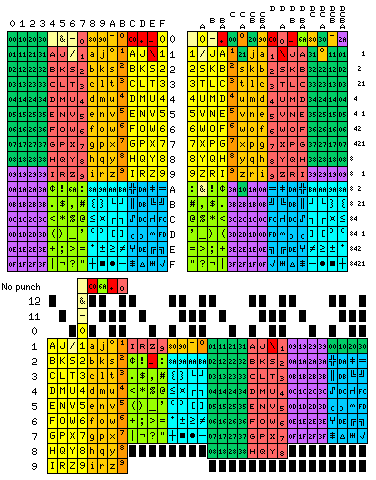
But some translations are easier than others...and the EBCDIC character set was designed to easily map onto the existing Hollerith cards.
-
From "The Punched Card" at _quadibloc:
-
Before ASCII became the standard, many of the internal codes used to represent characters within computers were strongly influenced by the punched card code for characters. One of the most famous of such codes, and one that has persisted in use the longest, is, of course, EBCDIC (Extended Binary-Coded Decimal Interchange Code). The diagram below illustrates the relationship between EBCDIC and punched card code:
- ...
-
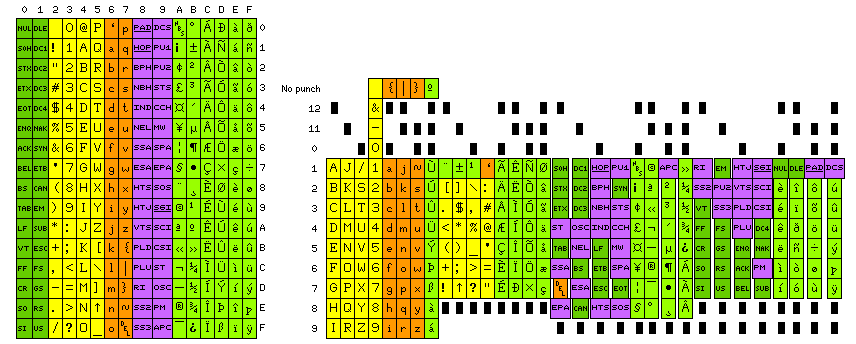
Here is a chart showing the form of 8-bit ASCII currently in use, and the official punched card code for 8-bit ASCII:
-
-
Other references:
-
Interesting page on IBM's failed experiment with a smaller card: http://www.ibmsystem3.nl/hist.html